
Analytics · A Guide to GA4's AI Assistant
What Is Google Analytics Ask Advisor?
Learn how Ask Advisor uses Gemini AI to answer questions about GA4 data, create visualisations and help marketers investigate website performance.
Beginner-friendly guide · 9–11 min read
Quick note
Ask Advisor can speed up initial analysis. Verify important numbers and conclusions in your GA4 reports before acting on them.
Google Analytics 4 (GA4) provides a wide range of reports and analysis tools, but finding a clear answer to a specific question can still take time. You might need to compare traffic sources, investigate a sudden drop in conversions or build an Exploration to understand how visitors move through your website.
Google's Ask Advisor aims to make this process easier. Built into Google Analytics and powered by Gemini models, it lets users ask questions about their Analytics property in everyday language. Instead of manually navigating several reports, you can ask a question and receive an answer supported by relevant data, visualisations or links to other reports.
For SEO specialists, digital marketers and business owners, this creates another way to investigate website performance. It does not remove the need to understand analytics, but it can make routine data analysis quicker and more accessible.
What Is Google Analytics Ask Advisor?
Ask Advisor is a conversational AI assistant integrated into Google Analytics. It uses Gemini models to help users understand their GA4 data, find information about property settings and get guidance on using Analytics features.
You can ask questions such as:
- How is my website performing this week?
- Why did organic search traffic decrease last month?
- Which pages generated the most purchases?
- How many data streams are connected to this property?
- How can I create an audience in Google Analytics?
Ask Advisor processes your question and uses information available within the selected Google Analytics property to generate a response. Depending on the question, it can provide a direct answer, a chart, a data summary or a link to a relevant report.
The assistant is designed to understand follow-up questions too. For example, if you ask why organic traffic declined and receive an answer identifying a particular landing page, you can ask which other pages experienced a similar change without starting a completely new conversation.
How Does Ask Advisor Work?
Ask Advisor uses natural-language processing and Gemini AI to interpret questions and connect them with relevant information in your GA4 property.
- Ask a question
Enter a question in the Ask Advisor panel using ordinary language. - Analyse the available data
The assistant interprets the request and examines relevant information from your Analytics property. - Review the response
It provides an answer, data visualisation, relevant report link or guidance, depending on the request.
Example prompt: “Why did organic search revenue decrease over the last 30 days?”
Ask Advisor can investigate the available revenue and acquisition data, identify patterns associated with the change and present findings that help you investigate further.
Keep in mind
Treat the response as an analytical starting point. You may still need to open relevant reports, check individual landing pages or compare the results with other data sources before deciding what caused the change.
What Can Ask Advisor Do in Google Analytics?
Google's documentation describes several types of questions that Ask Advisor can handle. These include general performance queries, diagnostic questions, visualisations, property configuration and guidance on using Analytics.
| Capability | Example question | What you can get |
|---|---|---|
| Performance summaries | “How is my website doing this week?” | A summary of available website performance data. |
| Performance diagnosis | “Why did revenue decrease on Monday?” | An analysis of possible reasons behind a change in performance. |
| Data visualisations | “Show active users over the last 30 days.” | Relevant charts, tables or other visual representations. |
| Property information | “What is my Measurement ID?” | Details about the selected Analytics property. |
| Platform guidance | “How do I create an audience?” | Instructions and links to relevant Analytics features. |
| Optimisation suggestions | “How can I re-engage users who left after viewing a product page?” | Recommendations based on available Analytics information. |
1. Get website performance summaries
You can use Ask Advisor to get a general overview of how your website is performing. Instead of opening several reports individually, ask a broad question about traffic, user acquisition or engagement.
Example prompt: “How has my website performed over the last seven days?”
This is useful when you want a quick overview before investigating individual channels or pages.
2. Investigate changes in traffic and conversions
One useful application is asking why a particular metric has increased or decreased. Ask Advisor can examine relevant information in the property and identify patterns that may explain the change. You can then ask follow-up questions to investigate specific traffic sources, landing pages or other dimensions.
Example prompt: “Why did organic search users decrease by 15% compared with the previous month?”
3. Generate data visualisations
Ask Advisor can create visualisations in response to questions about specific metrics, dimensions and events. A visual representation can make it easier to recognise changes over time than reading individual figures in a table.
Example prompt: “Show me the trend of active users from organic search over the last 30 days.”
4. Retrieve Google Analytics property information
You can ask questions about your GA4 property without manually searching through the Admin section. This can be useful when checking a configuration detail or finding a particular setting.
- What is my Measurement ID?
- How many data streams are connected to this property?
- How do I link this property to Google Ads?
5. Get help with Google Analytics features
Ask Advisor can explain how to use different Analytics features and guide you through common tasks. For example, you could ask how to create an audience, configure a particular setting or link your property to Google Ads. The assistant can provide instructions and links to relevant areas of the platform.
6. Explore optimisation opportunities
You can ask questions about improving website performance and engaging visitors. Ask Advisor can use the information available in your property to suggest areas worth investigating. You will need to assess whether its suggestions make sense for your website and marketing objectives.
Example prompt: “What can I do to re-engage users who leave after viewing a product page?”
How to Access and Use Ask Advisor
Ask Advisor is integrated into the Google Analytics interface. If your property is eligible, you can access it in two main ways.
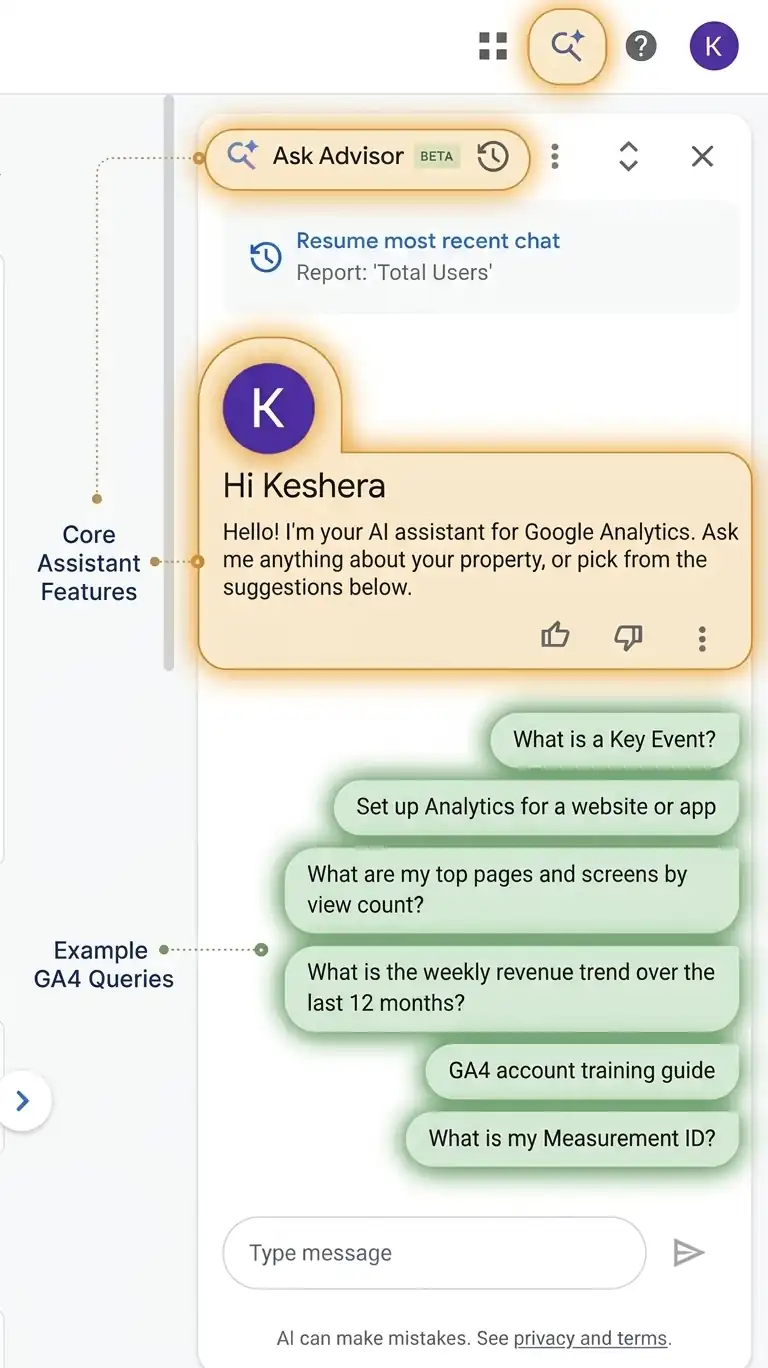
The Ask Advisor panel in Google Analytics 4, opened from the icon in the top navigation bar. Click the image to enlarge it.
Method 1: Use the top navigation area
- Open your Google Analytics 4 property.
- Look for the Ask Advisor icon in the top-right corner.
- Alternatively, click the Google Analytics Search box and select Ask Advisor.
- The assistant opens in a panel on the right side of the interface.
- Enter your question and review the response.
Method 2: Access it from a report visualisation
- Open the GA4 Home page, an overview report or a detail report.
- Hover over a supported chart visualisation card.
- Click the Ask Advisor icon in the top-right corner of the card.
- Select one of the suggested questions.
- Review the response or enter a follow-up question.
The second method is useful when you are already looking at a particular report and want to investigate something shown in its chart.
How Can SEO Specialists and Digital Marketers Use Ask Advisor?
Ask Advisor can be useful for day-to-day reporting and analysis, particularly when you need to investigate a performance change without building a detailed report from scratch. If you are new to the underlying reports, our guide to using GA4 for SEO covers the basics.
Monitor organic search performance
You can ask questions about organic search users, sessions, engagement and conversions over a specific period.
Example prompt: “How has organic search traffic changed over the last 30 days?”
This gives you a starting point for reviewing organic performance. If the assistant identifies a decline, you can follow up by asking about landing pages or other available dimensions.
Investigate landing page performance
Landing pages are important for SEO because they often represent the first interaction visitors have with a website. You can ask which landing pages generated the most organic sessions during a selected period, then investigate changes in engagement or conversions.
Example prompt: “Which landing pages generated the most organic sessions last month?”
Understand changes in conversions
An increase in organic traffic does not necessarily mean that a website is generating more leads or sales. Ask Advisor can help you investigate questions about purchases, leads and other conversion-related events recorded in GA4.
Example prompt: “Why did purchases from organic search decrease this month?”
Prepare performance reports
SEO consultants and digital marketing managers often need to explain changes in performance to clients or management teams. Ask Advisor can help produce quick summaries of available Analytics data. These can be used as a starting point for weekly or monthly reporting, although figures and conclusions should always be checked before sharing them.
Find answers without building every report manually
GA4 Explorations are useful for detailed analysis, but they can take time to configure. Ask Advisor provides another option when you need a quick answer to a specific question. It is particularly useful for initial investigations. More detailed analysis may still require Explorations, custom reports or other analytics tools.
Ask Advisor Best Practices
The quality of an AI-generated response depends partly on the question you ask and the information available in your Analytics property. These practices can help you get more useful answers.
- 01 · TimeframeSpecify the timeframeAvoid vague questions such as “How is my traffic doing?” when you need a particular period. Compare, for example, the last 30 days of organic search sessions with the previous 30 days.
- 02 · MetricMention the metric or eventBe clear about what you want to analyse, such as active users, sessions, purchases, revenue or a particular event, instead of asking about general performance.
- 03 · Follow-upsUse follow-up questionsYou do not need to include every detail in your first question. Start with the main issue and use follow-ups to investigate the response.
- 04 · DataCheck the data is availableAsk Advisor can only analyse information in the selected GA4 property. If an event is not collected, a parameter is missing or tracking is set up incorrectly, it cannot reliably analyse data that does not exist.
- 05 · VerifyVerify important findingsAI-generated responses can contain errors or misunderstandings. Check important figures against the relevant GA4 reports, especially for client reports or business decisions.
A typical follow-up sequence might look like this:
- Why did organic traffic decrease last month?
- Which landing pages contributed most to the decline?
- Did engagement also decrease on those pages?
Quick checklist before using an Ask Advisor insight
0 of 5 checked
Limitations of Google Analytics Ask Advisor
Ask Advisor can make analytics easier to navigate, but there are some limitations to understand before relying on it.
- Beta availability: Google identifies Ask Advisor in Google Analytics as a beta feature. Its capabilities may change as Google develops it.
- Language availability: Google's current documentation states that the GA4 experience is available in properties where English is the selected language.
- Account eligibility: The feature may not appear in every property or account immediately. Availability depends on eligibility and rollout.
- Property-specific data: Responses about Analytics data rely on information from the selected GA4 property. Do not assume that the GA4 assistant automatically combines data from every Google marketing platform.
- Data quality: Incorrect event tracking, missing parameters or incomplete data can affect the usefulness of its answers.
- AI accuracy: Ask Advisor can make mistakes. Its findings should be checked before they are used to support important decisions.
It is also worth distinguishing the GA4 assistant from Google's broader Ask Advisor initiative. Google has described plans for a connected experience across products such as Google Ads, Google Analytics and Merchant Center. However, the capabilities available in the GA4 interface should be judged against the current Google Analytics documentation rather than assuming every cross-product feature is already available there.
Is Ask Advisor Replacing GA4 Explorations?
No. Ask Advisor and Explorations serve different purposes.
Ask Advisor is useful when you want to ask a question and get a quick response. Explorations provide more control over how you build and examine reports, including the dimensions, metrics, segments and techniques used in your analysis.
For example, you might use Ask Advisor to investigate why organic traffic has decreased. If you need to examine user journeys, compare multiple segments or build a detailed funnel, GA4 Explorations may still be the better option.
The two tools can therefore complement each other. Ask Advisor helps you find a starting point, while Explorations allow you to investigate the data in greater detail.
Frequently Asked Questions
Ask Advisor is a feature within Google Analytics. Access depends on the eligibility of your property and Google's rollout of the beta experience. Check your Analytics interface and Google's latest documentation for current availability.
Yes. Google describes Ask Advisor in Google Analytics as a conversational experience powered by advanced Gemini models.
Yes. You can ask questions about organic search sessions, users, purchases and other information available in your GA4 property. The quality of the response depends on the data being collected and the question you ask.
Yes. It can generate visualisations in response to questions about specific metrics, dimensions and events. These can help you understand trends and compare performance.
Yes. You can continue a conversation by asking related questions or move on to another subject. For example, after investigating a decline in organic traffic, you can ask which landing pages experienced the largest changes.
Final Thoughts
Google Analytics Ask Advisor gives marketers and website owners a more conversational way to explore their GA4 data. Instead of navigating several reports for every question, users can ask about traffic trends, conversions, landing pages and property settings directly within Analytics.
For SEO specialists, it can be particularly useful when investigating organic search performance or preparing an initial performance summary. However, it should be treated as an assistant for analysis rather than a replacement for proper tracking, detailed reporting or human judgement.
Understanding the data still matters. Ask Advisor can help you find answers faster, but knowing whether those answers are accurate and what action to take remains your responsibility.
Further Reading
Tagged in
Categories
Written by
Keshera Wijeyesekera
I write Interesting to Read, a blog on all kinds of topics worth your time. Outside of the blog, I work in SEO and digital marketing.