Google Analytics · Beginner's Guide
Understanding Google Analytics 4 Hierarchy: Accounts, Properties, and Data Streams
Learn how GA4 organises accounts, properties and data streams, and how to choose a structure that makes sense for your websites, apps and business.
Beginner-friendly guide · 10–12 min read · Updated November 2026
Remember the order
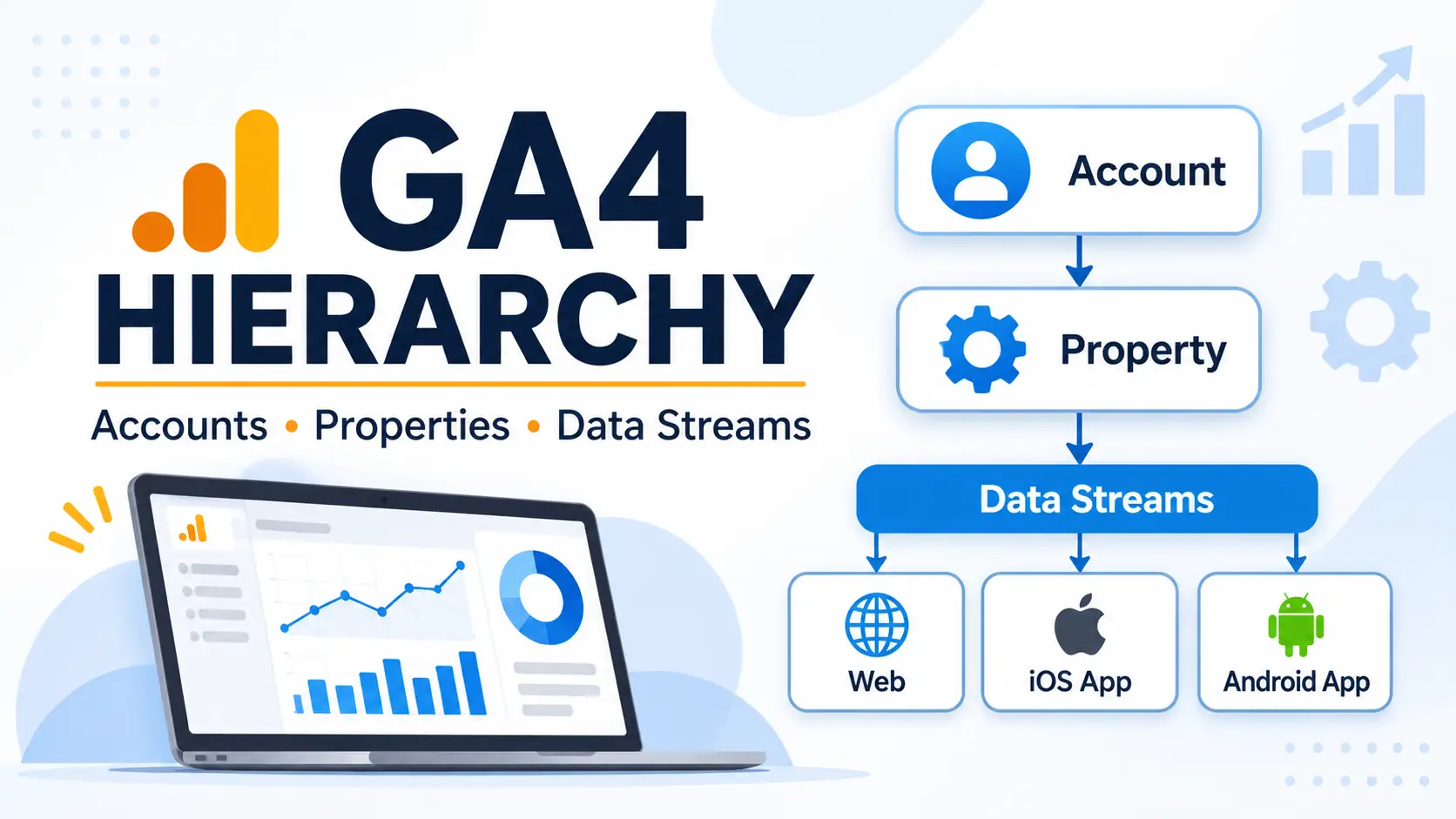
Account, then property, then data stream: organisation at the top, measurement in the middle and data collection at the bottom.
Google Analytics 4 (GA4) uses a structured system to organise website and app measurement. Understanding the Google Analytics 4 hierarchy is important when setting up analytics, managing multiple websites or tracking user activity across different platforms. The structure consists of three main levels: accounts, properties and data streams.
Each level has a specific purpose. Accounts provide the main organisational structure, properties contain measurement settings and reporting data, while data streams collect information from websites and mobile applications. Knowing how these elements work together helps you organise your analytics setup and maintain accurate reporting.
In this guide, we will explain the GA4 account structure, the difference between accounts and properties, how data streams work and how to choose the right setup for different business requirements.
At a glance
An account organises properties, a property brings measurement and reporting together, and a data stream sends activity from a website or app into a property.
What Is the Google Analytics 4 Hierarchy?
The Google Analytics 4 hierarchy is the organisational structure used to manage analytics accounts, properties and data streams. Each level builds on the previous one, allowing businesses to organise measurement according to their websites, applications and reporting requirements.
The standard structure follows this order:
- Level 01Google Analytics AccountOrganises properties
- Level 02GA4 PropertyManages measurement
- Level 03Data StreamCollects platform data
An account is the highest level in the standard GA4 structure. It provides a way to manage access and organise properties. A property represents the website, app or related group of digital platforms being measured. Data streams connect individual websites and mobile applications to a property and send their activity data to Google Analytics.
Unlike Universal Analytics, GA4 does not use Views as an additional reporting level. Instead, it provides reporting and filtering features within the property.
Understanding this hierarchy helps prevent common setup problems, such as placing unrelated websites in the same property or creating unnecessary accounts.
Google Analytics Account
A Google Analytics account is the top-level organisational container in the standard GA4 hierarchy. It allows an organisation to manage its properties, users and access permissions from one central location.
For example, a business operating several websites may use one Google Analytics account to manage separate properties for each website. An agency managing analytics for multiple clients may use different accounts to keep client ownership and administration separate.
What Does a Google Analytics Account Do?
An account provides several important management functions:
- Property management: Create and organise multiple GA4 properties under one account.
- User access: Add users and assign permissions to manage analytics resources.
- Administration: Manage account-level settings and access controls.
- Organisation: Keep related properties under a common business or ownership structure.
Google Analytics supports up to 100 accounts per Google account and up to 2,000 properties within an individual Analytics account. These are platform limits rather than recommended targets for every organisation.
Google Analytics Account Permissions
Account-level permissions determine what users can access and manage within an account. Permissions assigned at this level are inherited by the properties under it.
GA4 provides several permission roles:
| Role | Main permissions |
|---|---|
| Administrator | Full control over account or property settings, users and permissions. |
| Editor | Manage settings and configuration, excluding user permission management. |
| Marketer | Manage audiences, events, conversions and attribution-related settings. |
| Analyst | Create and manage explorations and access analysis features. |
| Viewer | View reports and configuration settings without making changes. |
The permissions available to a user depend on the role assigned to them. Account-level permissions are inherited by properties, so a user with broad account access may also have access to the properties within that account.
When Should You Create a Separate Google Analytics Account?
A separate account is useful when different organisations or legal entities need independent ownership and administration of their analytics data.
For example, a parent company may operate several businesses with separate management teams. If each business needs independent ownership and access management, separate accounts can be more appropriate than placing every property under one account.
However, a separate account is not necessary for every website. If several websites belong to the same organisation and share the same ownership and administration requirements, they can often be managed under one account using separate properties.
Google Analytics 4 Properties
A GA4 property is the level where measurement settings, reporting data and data streams are managed. It represents the website, mobile application or related group of digital platforms that an organisation wants to measure.
Properties sit beneath accounts in the Google Analytics 4 hierarchy. Each property has its own reporting environment, configuration settings and measurement arrangements.
For example, an organisation operating an online store and a separate corporate website may create two properties under one Google Analytics account. This allows the organisation to analyse each website independently.
What Does a GA4 Property Do?
A GA4 property brings together the measurement and reporting activities associated with a particular digital experience.
- Data collection: Receive information from connected web and app data streams.
- Reporting: Provide reports about users, traffic acquisition, engagement and conversions.
- Measurement settings: Manage events, key events, audiences and other analytics configurations.
- Data management: Control how collected data is retained and processed through available settings.
- Access management: Assign property-level permissions to users who need access to specific analytics data.
A property can contain multiple data streams, allowing related websites and applications to contribute data to the same reporting environment.
How Many Data Streams Can a GA4 Property Have?
A standard GA4 property can contain up to 50 data streams. This includes a maximum of 30 app data streams.
These limits provide flexibility when measuring activity across different platforms. However, reaching the maximum is not necessarily a good reason to combine unrelated websites or applications within one property.
Google's general recommendation: A typical business with a website and mobile applications will often use one web data stream, one iOS app data stream and one Android app data stream per property. The technical maximum is not a recommended target.
The appropriate configuration depends on how the organisation wants to measure its users and analyse its digital platforms.
GA4 Subproperties and Roll-Up Properties
Google Analytics 360 offers additional property-management capabilities, including subproperties and roll-up properties. These features are not generally available in standard GA4 properties.
A subproperty receives data from a single source property. It can provide a separate reporting environment containing a filtered subset of the source property's data.
A roll-up property combines data from multiple source properties into one reporting environment. This can help larger organisations analyse information from different brands, regions or business units in one place.
Both features have specific eligibility requirements, including an appropriate Google Analytics 360 setup. They should not be confused with the standard account, property and data stream structure available to ordinary GA4 users.
Google Analytics 4 Data Streams
A data stream is the connection through which a website or mobile application sends information to a GA4 property. It is the data collection level within the Google Analytics 4 hierarchy.
When you create a property, you can add the relevant data streams depending on the platforms you want to measure.
GA4 supports three types of data streams:
Web Data Stream
A web data stream collects information from a website. It uses a Measurement ID and a Google tag or another supported tagging implementation to send website activity to the connected GA4 property.
Web data streams can collect information such as:
- Page views
- Page scrolling
- Outbound link clicks
- Site searches
- File downloads
- Video engagement
Enhanced Measurement can automatically collect several types of website interactions without requiring separate event configuration for each one. The available options can be managed within the web data stream settings.
iOS App Data Stream
An iOS app data stream collects information from an application running on Apple's iOS platform.
It is generally configured using the Firebase SDK, which helps connect the mobile application to Google Analytics. Once implemented, it can collect information about app activity, user engagement and relevant events.
Android App Data Stream
An Android app data stream measures activity within an Android application. Like the iOS configuration, it typically uses the Firebase SDK to send app measurement data to the relevant GA4 property.
Businesses with both iOS and Android applications can create separate app data streams within the same property when they want to analyse their website and mobile app activity together.
Data Streams vs Properties: What Is the Difference?
Although properties and data streams are closely connected, they serve different purposes.
| Feature | GA4 Property | Data Stream |
|---|---|---|
| Main purpose | Organises measurement and reporting | Collects data from a digital platform |
| Position in hierarchy | Second level | Third level |
| Data collection | Receives data from connected streams | Sends website or app activity to a property |
| Configuration | Manages property-level measurement and reporting settings | Manages platform-specific collection settings |
| Examples | Online store property | Online store web stream |
In simple terms, a property is the main measurement environment, while a data stream is the connection that sends information from a website or application into that environment.
Examples of a Google Analytics 4 Account Structure
The appropriate GA4 account structure depends on the organisation's ownership, websites, applications and reporting requirements. The following examples illustrate how accounts, properties and data streams can be arranged.
- Example 01A business with one websiteA straightforward setup for a small business measuring one website.
Account: Business Analytics
└ Property: Main Website
└ Stream: Website Web Stream - Example 02Website and mobile appsOne property can bring related web and app measurement together.
Account: Business Analytics
└ Property: Digital Platforms
├ Stream: Website
├ Stream: iOS App
└ Stream: Android App - Example 03Parent company with multiple brandsSeparate properties can support independent brand reporting under shared ownership.
Account: Parent Company
├ Property: Brand A Website
├ Property: Brand B Website
└ Property: Brand C Website - Example 04Agency managing multiple clientsIndependent client ownership may call for separate accounts.
Account: Client A Analytics
Account: Client B Analytics
Account: Client C Analytics
The agency receives appropriate access. - Example 05Production and testing websiteA separate test property can keep development activity out of production reporting.
Account: Business Analytics
├ Property: Production Website
└ Property: Test Environment
These are illustrative structures rather than fixed rules. Choose the arrangement that reflects your ownership model and the way you need to report on user journeys.
Best Practices for Organising Your GA4 Account Structure
Setting up accounts, properties and data streams correctly can make analytics easier to manage as an organisation grows. Consider the following practices when planning your GA4 account structure.
Organise Accounts Around Ownership
Create accounts based on how the organisation owns and manages its analytics data. Separate accounts are useful when different businesses or legal entities require independent administration. Avoid creating unnecessary accounts simply because a business has multiple websites.
Use Separate Properties for Distinct Digital Experiences
A property should represent a logical user base or digital experience. If websites serve unrelated audiences or require independent reporting, separate properties may be more suitable.
However, related websites that form part of the same customer journey may benefit from a shared property and an appropriate measurement configuration.
Choose Data Streams Based on Your Platforms
Create the data streams needed to measure your website and applications. A typical business with a website and mobile applications may use one web stream, one iOS stream and one Android stream within the same property.
Avoid creating additional streams without a clear measurement requirement.
Configure Cross-Domain Measurement Where Necessary
If users move between related domains during the same journey, cross-domain measurement can help track those interactions more consistently.
For example, an online store may use one domain for browsing products and another domain for completing purchases. When both domains are part of the same user journey, cross-domain measurement can help preserve the journey across them.
This typically involves configuring the relevant domains within a single web data stream and ensuring the Google tag is implemented correctly.
Review User Permissions Regularly
Give users access according to their responsibilities. Account-level permissions are inherited by properties, so review these carefully before assigning broad access.
Where users only need to manage or analyse one property, property-level permissions can provide a more appropriate level of access.
Keep Testing Activity Separate From Production Data
Development and testing activity can affect analytics reports if it is collected alongside genuine website traffic. Consider using a separate test property or an appropriate testing arrangement to keep production reporting reliable.
GA4 structure quick-check
Tick off each point as you review your setup.
0 of 6 checked
Frequently Asked Questions
The standard Google Analytics 4 hierarchy consists of three levels: Account, Property and Data Stream. Accounts organise properties, properties manage measurement and reporting, and data streams collect information from websites and applications.
A Google Analytics account is the top-level container used to manage properties, users and access permissions. A GA4 property is the measurement environment where reporting data and configuration settings are managed.
Yes. A standard GA4 property can contain up to 50 data streams, including a maximum of 30 app data streams. These can include web, iOS and Android streams.
No. Google Analytics 4 does not use the Views structure found in Universal Analytics. Instead, GA4 provides reporting, filtering and analysis features within properties.
It depends on the websites' ownership, audiences and reporting requirements. Separate properties are often appropriate for unrelated websites that require independent reporting. Related websites that form part of the same user journey may be better managed within one property, depending on the measurement setup.
Conclusion
Understanding the Google Analytics 4 hierarchy helps businesses organise their analytics setup and manage data more effectively. Accounts provide the main organisational structure, properties manage measurement and reporting, and data streams collect information from websites and mobile applications.
The right GA4 account structure depends on how an organisation manages its digital platforms, ownership and reporting requirements. By choosing appropriate accounts, properties and data streams, businesses can create a more organised measurement environment and make better use of their analytics data.
Further Reading
Tagged in
Categories
Written by
Keshera Wijeyesekera
I write Interesting to Read, a blog on all kinds of topics worth your time. Outside of the blog, I work in SEO and digital marketing.